Suran offers data hosting services for Payroll clients using our established hosting service.
Elements
|
Element |
Purpose |
Location |
Stack |
Managed By |
|---|---|---|---|---|
|
Payroll client app |
Windows or macOS application |
TS or local PC/Mac |
Omnis Studio |
DealerBuilt/Dealer |
|
Data Hosting Server |
PostgreSQL hosting server |
Cloud VM |
PostgreSQL |
Suran |
|
Suran Database Manager |
Database on hosting server tracking available databases and ownership |
Cloud VM |
PostgreSQL Database |
Suran |
|
Client Database |
Database on hosting server with client data |
Cloud VM |
PostgreSQL Database |
Client |
|
Ferret |
Authentication web service |
Cloud VM |
Sinatra |
Suran |
|
Suran User File (SUF) |
Suran in-house CRM with hosting ID, passwords, hosts for all clients Note: authentication data used in this system is mirrored to ferret and to data hosting servers for optimization |
Cloud VM |
PostgreSQL database |
Suran |
|
Suran API |
RESTful API |
Cloud VM |
Ruby on Rails Redis for caching |
Suran |
|
Engage |
Responsive web app for employee data access |
Cloud VM |
Ember |
Suran |
|
LightYear database |
Data exchange with Payroll database to/from LightYear application |
LightYear database host |
PostgreSQL |
DealerBuilt/Dealer |
Facilities
Cloud VMs
-
Services are hosted on Linode VMs managed by Suran
-
Suran manages the entire server
-
Linode manages underlying hardware
-
Linode provides
-
Redundant power
-
Redundant fiber
-
24/7/365 onsite NOC
-
-
Rotating snapshots of VMs are taken and stored with Linode
-
Servers are continuously monitored for uptime, resource usage, data integrity by Suran
-
Administrative access to servers is limited to the Suran operations and development team
-
Each server hosts data for multiple clients (multi-tenant) using unique database(s) per client
-
Suran servers offer the same disk-level Payroll database encryption as DealerBuilt-hosted database servers
Client Backups
-
A logical (pg_dump) backup is taken nightly of each database
-
Backups are uploaded to Amazon AWS' S3 service
-
Backups are retained for one day on the local hosting server
-
Backups are retained for 14 days on S3
-
Access to S3 is limited to:
-
The hosting server via API
-
Suran operations and development team
-
-
Client data can be loaded by by development for triage within our hosting environment and is not stored on developer workstations
Ports
|
Host |
Port |
Use |
|---|---|---|
|
Ferret |
443 |
Authentication and lookup |
|
Data Hosting Server |
443 |
Suran API access |
|
Data Hosting Server |
9566 |
PostgreSQL data access |
IP Addresses
-
ferret.suran.com is reachable at 172.104.11.248
-
Hosting server IP addresses vary
-
Access to databases for a given client can be restricted to source IP(s) (dealer location) for additional security, if desired
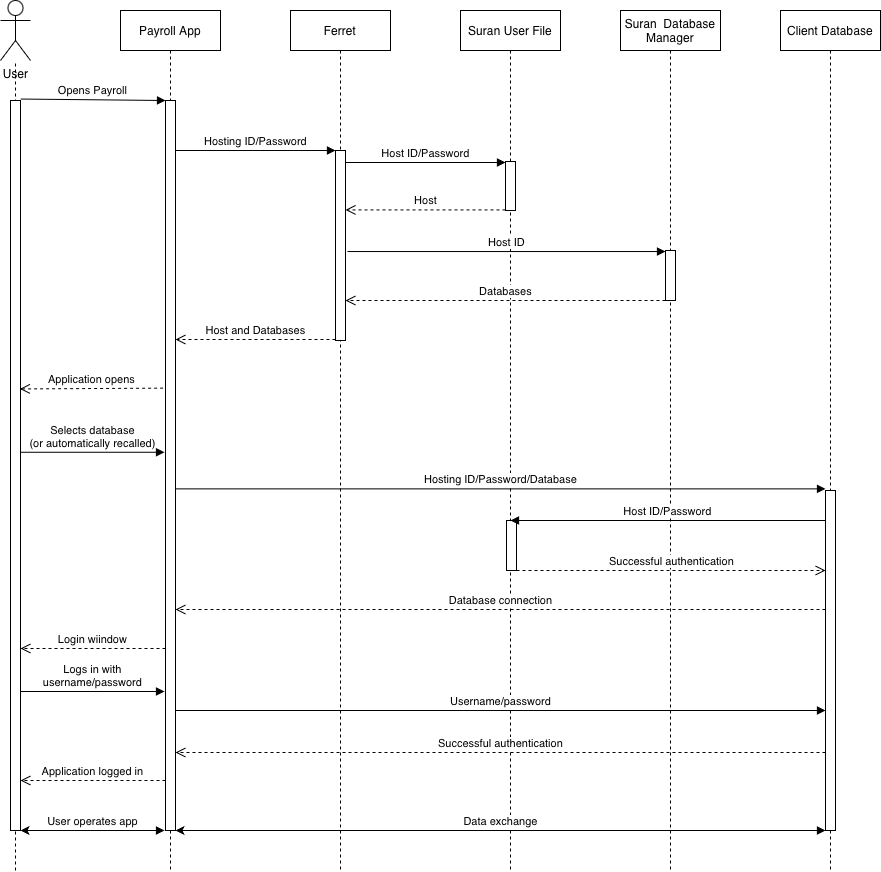
Payroll Authentication and Data Access
-
Each client is given a unique hosting ID and password
-
Payroll is configured with this hosting ID and password in lieu of an IP address/port
-
Payroll authenticates with Ferret
-
A host and available databases are returned
-
Payroll authenticates to the host and connects to a database with the hosting ID and password using an encrypted connection
-
The user authenticates with their username/password stored in the Payroll database
-
The user logs in and uses the applications
LightYear Authentication and Data Access
-
DealerBuilt staff configure the LightYear databases with:
-
Data Hosting Server IP
-
Database name
-
API PostgreSQL user name (specific to the client)
-
API PostgreSQL password (specific to the client)
-
-
LightYear databases connect with the API credentials to the client database to perform direct data access
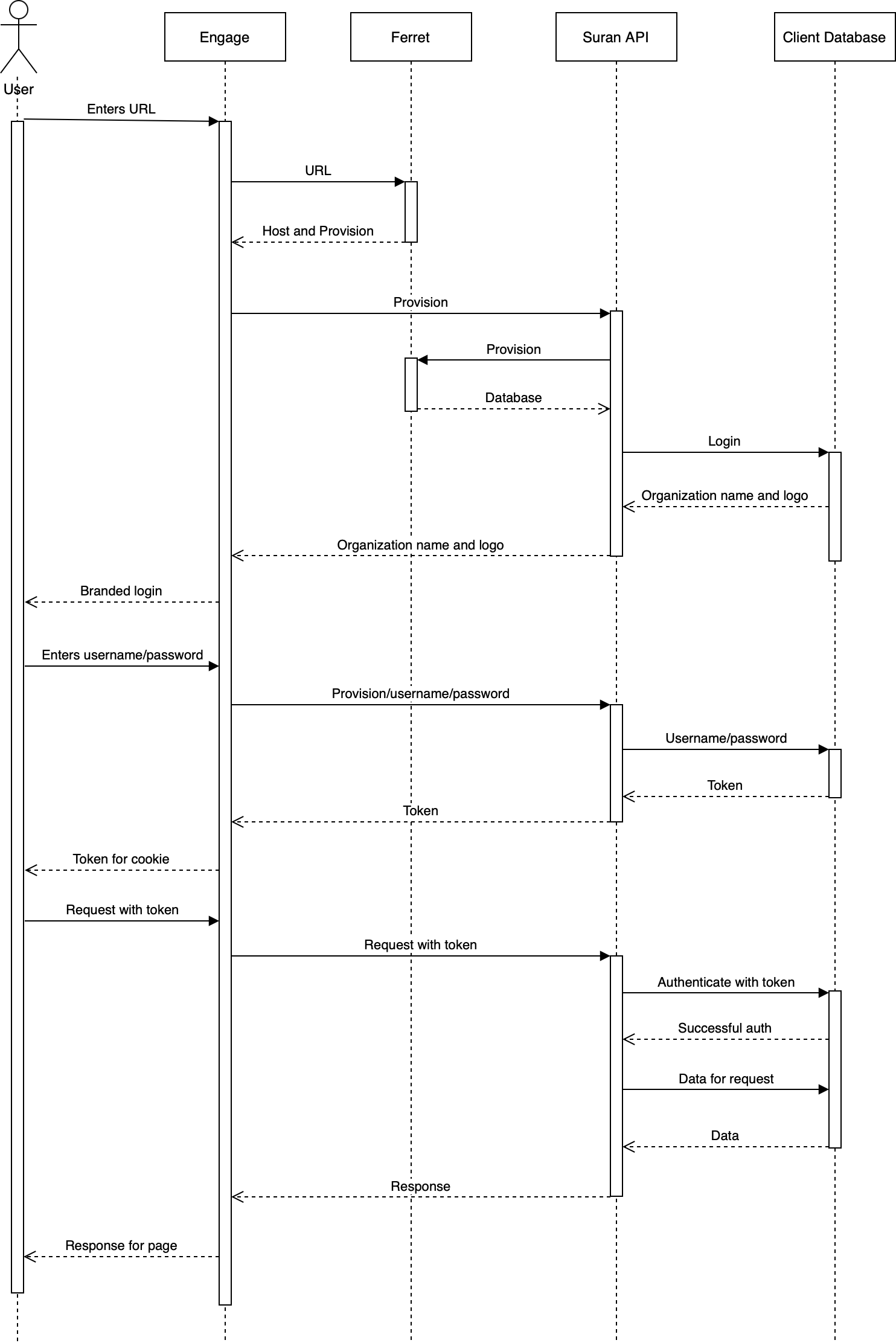
Engage Authentication and Data Access
-
User enters their unique Engage URL
-
Engage sends the unique URL to Ferret
-
Ferret provides a hosting server and provision code (unique ID for that database)
-
Engage authenticates to Suran API on the hosting server with the provision
-
Suran API uses the provision to connect to the client's database
-
Engage queries Suran API for the organization name and logo
-
Engage presents a branded login window
-
User enters their username and password
-
Engage authenticates to Suran API on the hosting server with the username, password, and provision
-
Suran API uses the provision to connect to the client's database
-
Suran API authenticates with the username and password stored in the client's database
-
Suran API returns an authentication token
-
Engage stores the token and provision in a browser cookie
-
Subsequent requests provide the token and provision for authentication
-
Tokens are revoked after 30 minutes of inactivity